
Blog Guide
How to find historical prices for an expired US option
Find what one US option contract traded at after its expiry, with a complete lookup of a TSLA call, how to read the coverage, and what a missing record means.
To find the price history of an expired option, you need four facts about the contract: the underlying, the expiry date, call or put, and the strike. Then you need a source that keeps contracts after their expiry.
Your broker records show your own fills. Many broker screens stop showing a contract after its expiry. The free TradeRecount lookup shows the recorded minute bars of one US option contract, also after its expiry. It needs no account.
Before you use a price, read the coverage of the result. A minute with no record is not a minute with a price of zero.
1. Write down the contract
An option contract has four parts. Get each part from your trade confirmation or your broker statement.
| Part | Meaning | Example |
|---|---|---|
| Underlying | The stock or fund that the option is on | TSLA |
| Expiry | The last date of the contract | 18 September 2026 |
| Type | Call or put | Call |
| Strike | The price at which the holder can buy or sell the underlying | $400 |
Many data sources join the four parts into one contract symbol. The lookup shows the contract above as O:TSLA260918C00400000:
TSLAis the underlying.260918is the expiry as year, month, and day.Cis a call. A put hasP.00400000is the strike multiplied by 1,000, with 8 digits. A $402.50 strike is00402500.
The O: at the start is a prefix of the archive. Other sources can write the symbol without it.
2. Start with your broker records
Your trade confirmation shows the time, the price, and the quantity of your own fill. It is the best record of what you paid or received.
It does not show what the contract did before or after your fill. For that, you need the price history of the contract, and a broker may not keep it. For example, Interactive Brokers lists "Expired options" as unavailable historical data in its API documentation.
Data vendors sell option price history. For a few contracts, you do not need a subscription. The comparison of historical options data sources lists free and paid sources.
3. Look up the contract
Open the lookup and enter the four parts of the contract. You can also enter a trade date. Without a date, the page shows the last day with records.
Here is a complete lookup. The contract is the TSLA call with a $400 strike and expiry on 18 September 2026. No trade date was entered, so the page shows the expiry day. Open this contract in the lookup.
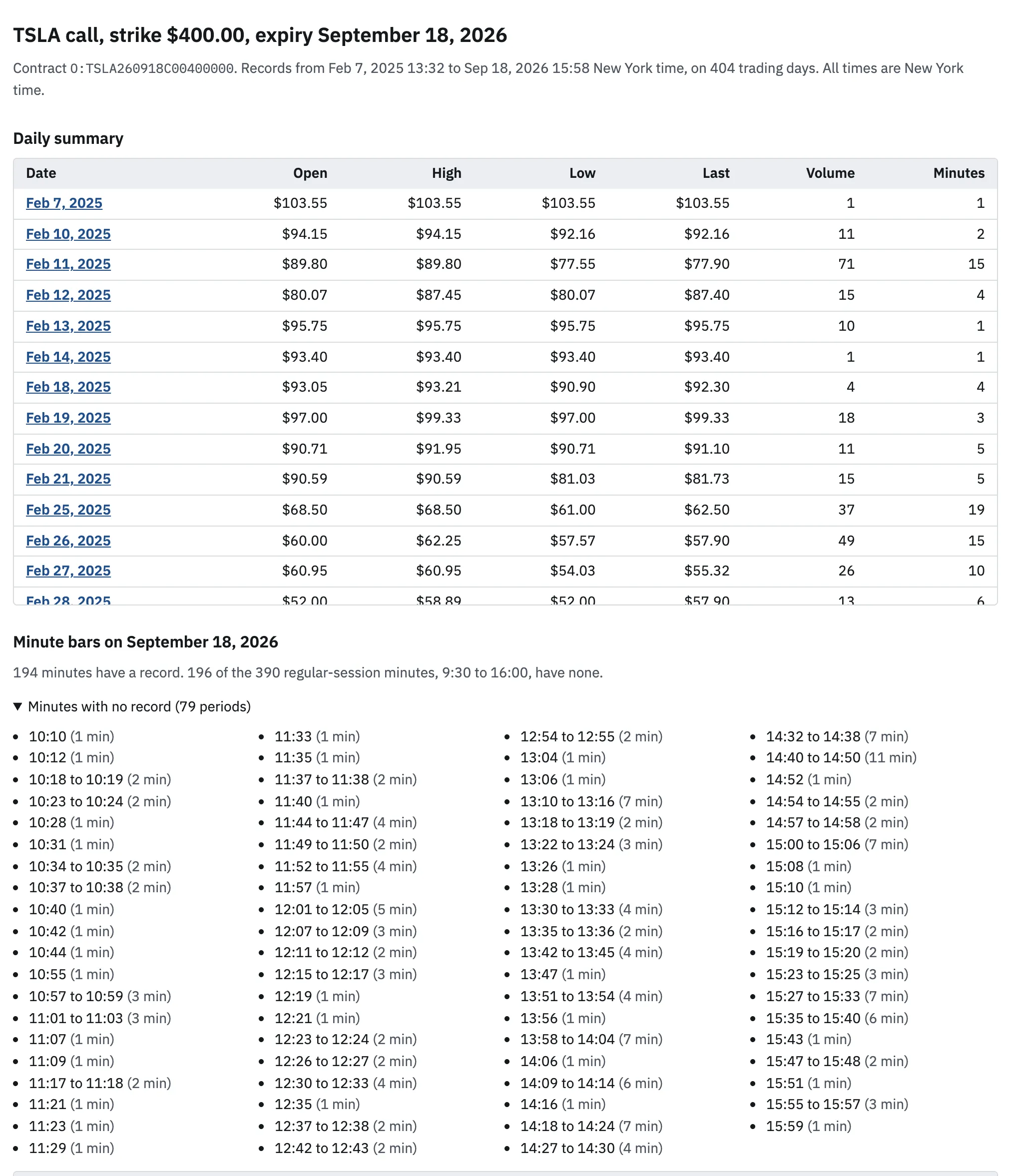
The heading names the contract. Below it, the page gives the coverage of the contract. The first record is on 7 February 2025 at 13:32. The last record is on 18 September 2026 at 15:58. The archive has records on 404 trading days. All times are New York time.
The daily summary has one row for each day with records: open, high, low, last price, volume, and the number of minutes with a trade. On the expiry day the row is:
| Date | Open | High | Low | Last | Volume | Minutes |
|---|---|---|---|---|---|---|
| 18 September 2026 | $0.04 | $0.04 | $0.01 | $0.01 | 5,913 | 194 |
Below the summary are the minute bars of one day. A minute bar is the open, high, low, and close price and the traded volume of one minute. On the expiry day, the first bar is at 09:30: open $0.04, high $0.04, low $0.02, close $0.03, volume 27. The last bar is at 15:58: $0.01, volume 3.
To see another day, select its date in the daily summary. For example, the last recorded price on 22 July 2026 was $18.20. The first recorded price on 23 July 2026 was $7.30. Open 23 July 2026. The minute bars of that day show when the trades occurred.
Then compare the recorded prices with the time and the price on your trade confirmation. Check the time zone of your broker records first, because brokers can use a different time zone.
4. Read the coverage before you use a price
The coverage tells you how much the result can support. Read it before the prices.
First and last record
The first record is the first trade in the archive. It does not tell you when the contract was first listed. For example, the TSLA call with a $402.50 strike and the same expiry has records from 10 September 2026 only, on 7 trading days. Open the $402.50 call.
Minutes with a record
The regular session has 390 minutes, from 9:30 to 16:00. On its expiry day, the $400 call has a record in 194 minutes. 196 minutes have no record, in 79 periods. The page lists each period.
- Every minute from 09:30 to 10:09 has a record. The first minute with no record is 10:10.
- The longest period with no record is 14:40 to 14:50, which is 11 minutes.
Days with few trades
A contract with a long life can have days with few trades. On 7 February 2025, this contract has one record: one contract traded at $103.55 in one minute.
The gap list counts all 390 minutes on each day. It does not know market holidays or early closes.
5. When the archive has no record
The lookup tells you when it has no record. It does not invent a price.
No record of the underlying and expiry
The archive has no options on AAPL, FB, or BRK.B. A lookup of an AAPL call with expiry 18 September 2026 gives this message: "The archive has no records for this underlying and expiry."
No record on the date
The first record of the TSLA $400 call is on 7 February 2025. A lookup of 6 February 2025 says that the archive has no record of this contract on this date. Open 6 February 2025.
No record in a minute
On the expiry day, the $400 call has no record at 10:10. A missing minute can mean that no trade occurred in that minute. It can also mean that the source data is missing. The record does not tell you which.
So do not fill a missing minute with the price of the minute before it. If your fill time falls in a gap, compare your price with the nearest bars before and after the gap.
What the records cannot show
- A minute bar shows recorded trades. It does not show the price at which your order could fill.
- The records have no bid or ask quotes. A quote is a price that a buyer or seller offers.
- A minute bar does not show the order of trades inside the minute.
- The archive holds options on 1,889 underlyings. SPY, QQQ, IWM, and TSLA records start in June 2014. Most other underlyings start in October 2021 or later.
- The records end on 2 October 2026.
The prices are records of past trades. They are not investment advice.
Common questions
Can I find the price of an option that has already expired?
Yes, when a source keeps the contract after its expiry. The TradeRecount lookup shows expired contracts for free when the archive has records for them. If it has no record, the page says so.
Why does my broker not show the expired contract?
Many broker screens stop showing a contract after its expiry. Interactive Brokers lists expired options as unavailable historical data in its API documentation. Your trade confirmation still shows your own fill.
Is the recorded price the price that I could have traded at?
No. A minute bar shows trades that other people made in that minute. Your order could fill at a different price, or not fill at all.
Why is there no price for some minutes?
Many option contracts do not trade every minute. A gap can also come from missing source data. The lookup lists each gap and does not fill it with an estimate.
Sources
Each source was read on 27 October 2026.
- The TradeRecount lookup results for the contracts on this page.
- Interactive Brokers: Unavailable Historical Data